
Keep everyone in sync on Sunday.
From front of house to backstage and across campuses, everyone can finally stay in sync.

POWERFUL INTEGRATIONS
Bring every tool together
Everything your team relies on, connected in one dashboard where it all works together.
POWERFUL INTEGRATIONS
Bring every tool together
Everything your team relies on, connected in one dashboard where it all works together.
FLEXIBLE OUTPUTS
Dashboards for every screen
Display dashboards on TVs, tablets, desktops, mobile devices, and more.
FLEXIBLE OUTPUTS
Dashboards for every screen
Display dashboards on TVs, tablets, desktops, mobile devices, and more.
LIVE COMMAND CENTER
Your entire operation in one view
See every service, location, and connected tool from one command center.
LIVE COMMAND CENTER
Your entire operation in one view
See every service, location, and connected tool from one command center.
How it works
How it works
A dashboard for every role
A dashboard
for every role
A dashboard for every role
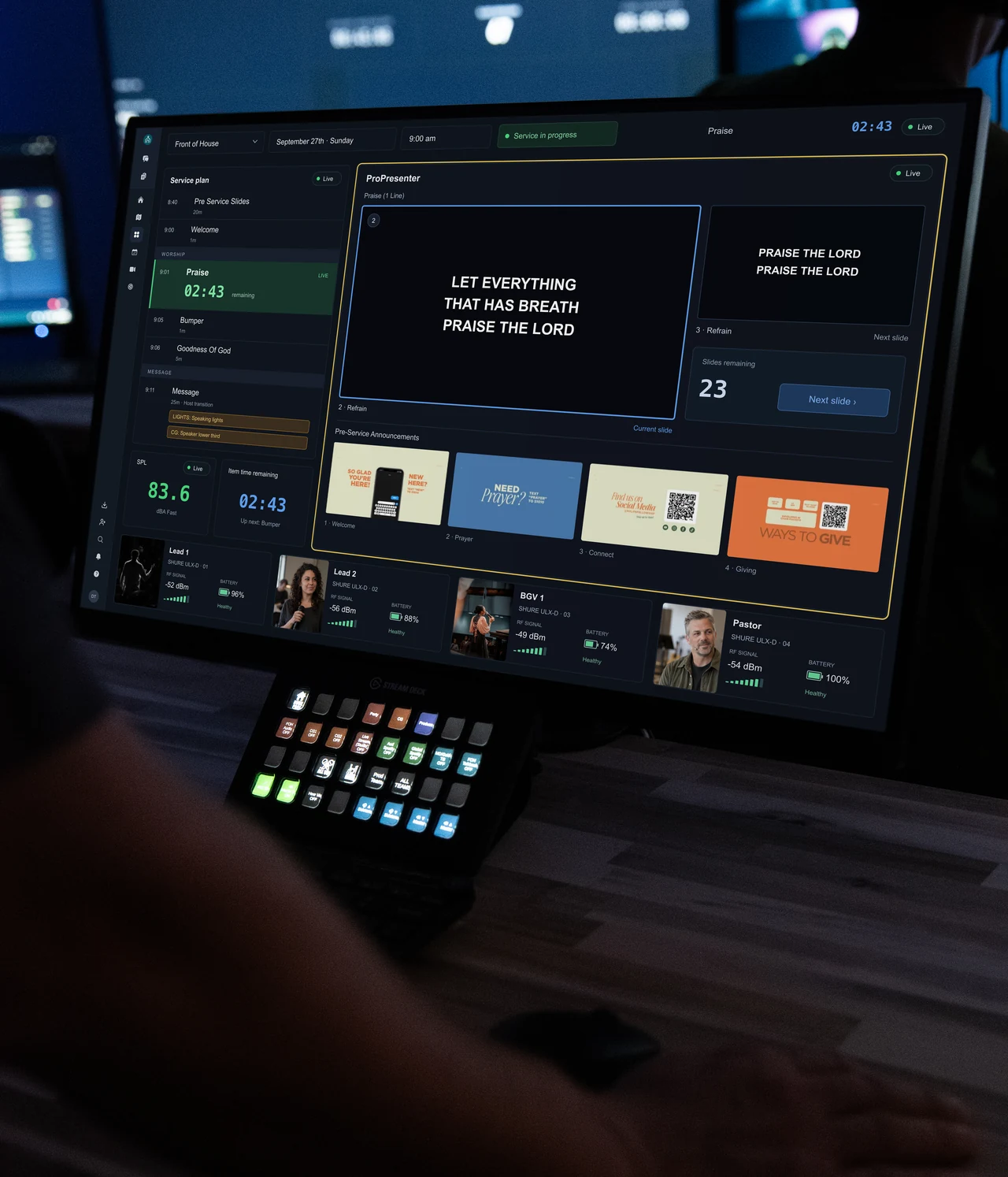
Drag, resize, and arrange live widgets into custom dashboards for every role on your team. Give each person exactly the information they need.


Track plans & timers

Sync playlists & slides

Sync timers

Follow & trigger slides

Track livestream viewership

Track livestream viewership

Embed livestream

Track SPL

View transcription feed

Display gear assignments
Track plans & timers
Sync playlists & slides
Sync timers
Follow & trigger slides
Track livestream viewership
Track livestream viewership
Embed livestream
Track SPL
View transcription feed
Display gear assignments
Track plans & timers
Sync playlists & slides
Sync timers
Follow & trigger slides
Track livestream viewership
Track livestream viewership
Embed livestream
Track SPL
View transcription feed
Display gear assignments
All your tools in one place
All your tools in one place
Bring Planning Center, ProPresenter, SMAART, Resi, ProdCom, livestream analytics, gear assignments, notes, and more into one customizable workspace.
All your tools
in one place
Bring Planning Center, ProPresenter, SMAART, Resi, ProdCom, livestream analytics, gear assignments, notes, and more into one customizable workspace.
Auto-track your service
Auto-track
your service
Auto-track your service
Run ProPresenter like you always have. As your operator advances through slides, MxU automatically tracks every Planning Center item in real time.
See how Sunday went.
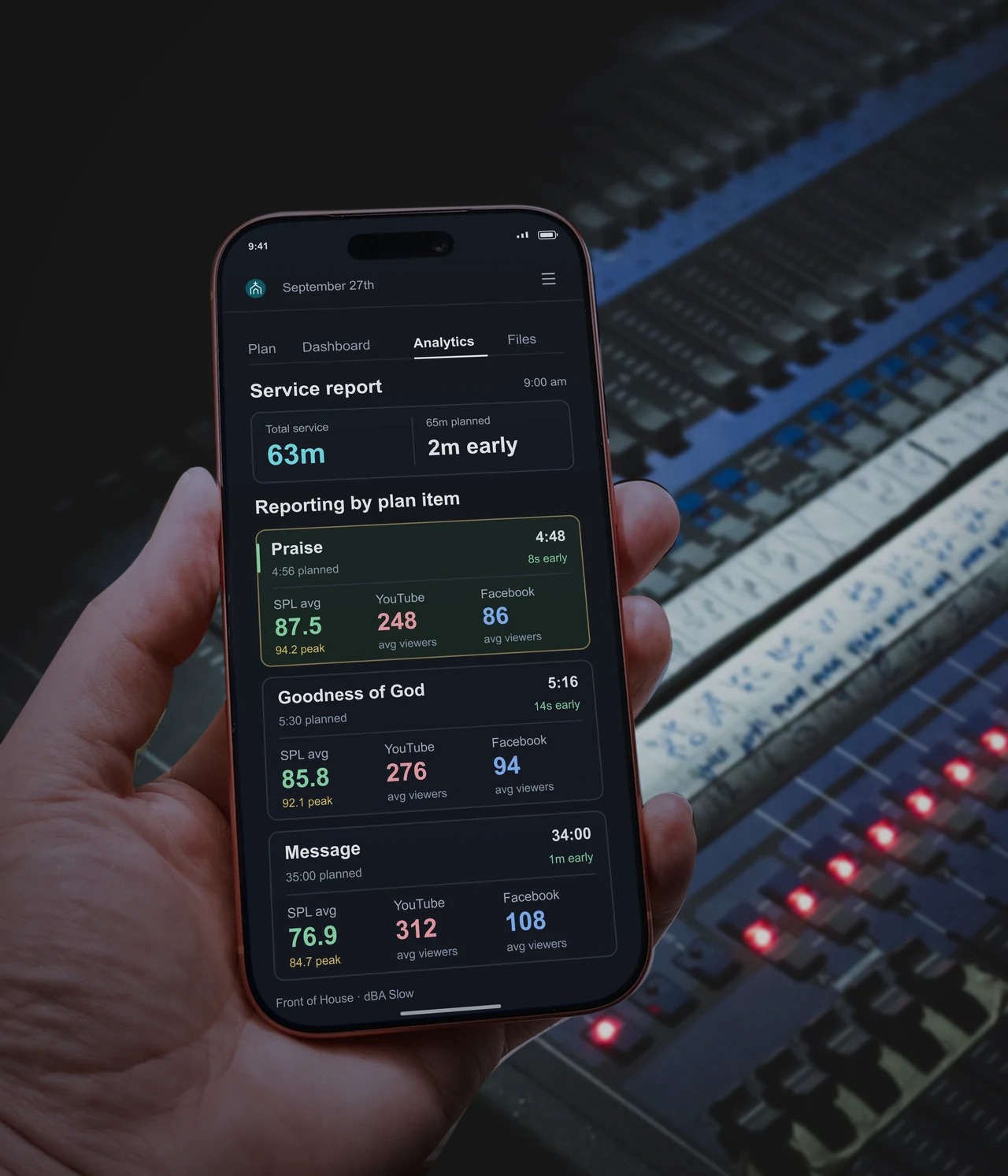
See how Sunday went.
See how each plan item performed, from timing and SPL to YouTube and Facebook viewers. MxU captures the details as you serve, so your team can review Sunday and prepare for the next one.
Powerful Built-In Tools
Powerful Built-In Tools

Keep everyone on the same page
Create shared notes, build checklists, and track task completion in real time so your team stays aligned from rehearsal to teardown.
Native SPL & RTA
Connect any compatible audio interface or network audio source to monitor live SPL and RTA directly inside MxU. No additional software required.


Control more than your dashboard
Bring live video into your dashboard with NDI and RTMP, then trigger cues, lighting, and automation using native MIDI and OSC support.
Trusted by the best
Find out why MxU is the top choice for worship and tech teams across the globe.
“This is the first time our worship and tech teams feel aligned, trained, and ready to execute every Sunday without confusion or last minute scrambling.”

Brooke Nicholls
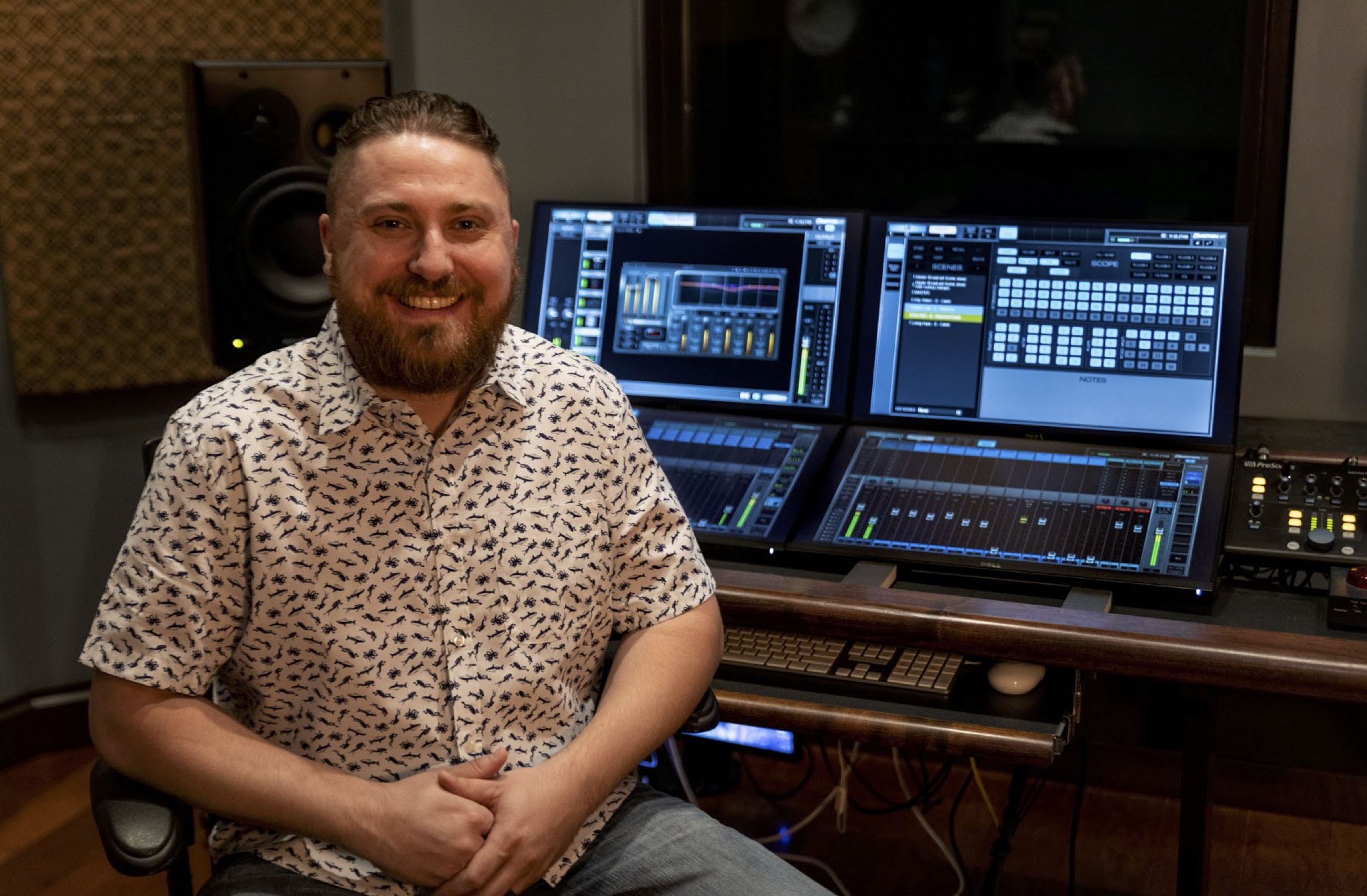
“New audio volunteers can fly solo in weeks because training is structured and repeatable instead of shadowing and hoping they figure it out.”
Dave Bookhout
"I am not the bottleneck anymore, volunteers are trained, communication is clear, and Sundays run without me fixing problems the entire morning."
Corey Miller
"We went from last minute panic before service to a team that shows up prepared and executes without constant direction from me."

Ethan Matthews
"We onboard new volunteers in weeks now, not months, and they actually know their role before touching a console or stepping on stage."

Tyler Corbin
"Our band used to guess transitions every Sunday, now everyone knows the plan, cues are clear, and nothing feels rushed or last minute."

Brielle Lidtka
"I am not the bottleneck anymore, volunteers are trained, communication is clear, and Sundays run without me fixing problems the entire morning."
Corey Miller
"We went from last minute panic before service to a team that shows up prepared and executes without constant direction from me."
Ethan Matthews
"Our band used to guess transitions every Sunday, now everyone knows the plan, cues are clear, and nothing feels rushed or last minute."
Brielle Lidtka
“New audio volunteers can fly solo in weeks because training is structured and repeatable instead of shadowing and hoping they figure it out.”
Dave Bookhout
"We onboard new volunteers in weeks now, not months, and they actually know their role before touching a console or stepping on stage."
Tyler Corbin
“This is the first time our worship and tech teams feel aligned, trained, and ready to execute every Sunday without confusion or last minute scrambling.”
Brooke Nicholls
"We onboard new volunteers in weeks now, not months, and they actually know their role before touching a console or stepping on stage."
Tyler Corbin
"Our band used to guess transitions every Sunday, now everyone knows the plan, cues are clear, and nothing feels rushed or last minute."
Brielle Lidtka
"We went from last minute panic before service to a team that shows up prepared and executes without constant direction from me."
Ethan Matthews
“New audio volunteers can fly solo in weeks because training is structured and repeatable instead of shadowing and hoping they figure it out.”
Dave Bookhout
"I am not the bottleneck anymore, volunteers are trained, communication is clear, and Sundays run without me fixing problems the entire morning."
Corey Miller
“This is the first time our worship and tech teams feel aligned, trained, and ready to execute every Sunday without confusion or last minute scrambling.”
Brooke Nicholls
Trusted by the best
Find out why MxU is the top choice for worship and tech teams across the globe.
“This is the first time our worship and tech teams feel aligned, trained, and ready to execute every Sunday without confusion or last minute scrambling.”
Brooke Nicholls
“New audio volunteers can fly solo in weeks because training is structured and repeatable instead of shadowing and hoping they figure it out.”
Dave Bookhout
"I am not the bottleneck anymore, volunteers are trained, communication is clear, and Sundays run without me fixing problems the entire morning."
Corey Miller
"We went from last minute panic before service to a team that shows up prepared and executes without constant direction from me."
Ethan Matthews
"We onboard new volunteers in weeks now, not months, and they actually know their role before touching a console or stepping on stage."
Tyler Corbin
"Our band used to guess transitions every Sunday, now everyone knows the plan, cues are clear, and nothing feels rushed or last minute."
Brielle Lidtka
Trusted by the best
Find out why MxU is the top choice for worship and tech teams across the globe.
“This is the first time our worship and tech teams feel aligned, trained, and ready to execute every Sunday without confusion or last minute scrambling.”
Brooke Nicholls
“New audio volunteers can fly solo in weeks because training is structured and repeatable instead of shadowing and hoping they figure it out.”
Dave Bookhout
"I am not the bottleneck anymore, volunteers are trained, communication is clear, and Sundays run without me fixing problems the entire morning."
Corey Miller
"We went from last minute panic before service to a team that shows up prepared and executes without constant direction from me."
Ethan Matthews
"We onboard new volunteers in weeks now, not months, and they actually know their role before touching a console or stepping on stage."
Tyler Corbin
"Our band used to guess transitions every Sunday, now everyone knows the plan, cues are clear, and nothing feels rushed or last minute."
Brielle Lidtka
"I am not the bottleneck anymore, volunteers are trained, communication is clear, and Sundays run without me fixing problems the entire morning."
Corey Miller
"We went from last minute panic before service to a team that shows up prepared and executes without constant direction from me."
Ethan Matthews
"Our band used to guess transitions every Sunday, now everyone knows the plan, cues are clear, and nothing feels rushed or last minute."
Brielle Lidtka
“New audio volunteers can fly solo in weeks because training is structured and repeatable instead of shadowing and hoping they figure it out.”
Dave Bookhout
"We onboard new volunteers in weeks now, not months, and they actually know their role before touching a console or stepping on stage."
Tyler Corbin
“This is the first time our worship and tech teams feel aligned, trained, and ready to execute every Sunday without confusion or last minute scrambling.”
Brooke Nicholls
"We onboard new volunteers in weeks now, not months, and they actually know their role before touching a console or stepping on stage."
Tyler Corbin
"Our band used to guess transitions every Sunday, now everyone knows the plan, cues are clear, and nothing feels rushed or last minute."
Brielle Lidtka
"We went from last minute panic before service to a team that shows up prepared and executes without constant direction from me."
Ethan Matthews
“New audio volunteers can fly solo in weeks because training is structured and repeatable instead of shadowing and hoping they figure it out.”
Dave Bookhout
"I am not the bottleneck anymore, volunteers are trained, communication is clear, and Sundays run without me fixing problems the entire morning."
Corey Miller
“This is the first time our worship and tech teams feel aligned, trained, and ready to execute every Sunday without confusion or last minute scrambling.”
Brooke Nicholls
Trusted by the best
Find out why MxU is the top choice for worship and tech teams across the globe.
“This is the first time our worship and tech teams feel aligned, trained, and ready to execute every Sunday without confusion or last minute scrambling.”
Brooke Nicholls
“New audio volunteers can fly solo in weeks because training is structured and repeatable instead of shadowing and hoping they figure it out.”
Dave Bookhout
"I am not the bottleneck anymore, volunteers are trained, communication is clear, and Sundays run without me fixing problems the entire morning."
Corey Miller
"We went from last minute panic before service to a team that shows up prepared and executes without constant direction from me."
Ethan Matthews
"We onboard new volunteers in weeks now, not months, and they actually know their role before touching a console or stepping on stage."
Tyler Corbin
"Our band used to guess transitions every Sunday, now everyone knows the plan, cues are clear, and nothing feels rushed or last minute."
Brielle Lidtka
"I am not the bottleneck anymore, volunteers are trained, communication is clear, and Sundays run without me fixing problems the entire morning."
Corey Miller
"We went from last minute panic before service to a team that shows up prepared and executes without constant direction from me."
Ethan Matthews
"Our band used to guess transitions every Sunday, now everyone knows the plan, cues are clear, and nothing feels rushed or last minute."
Brielle Lidtka
“New audio volunteers can fly solo in weeks because training is structured and repeatable instead of shadowing and hoping they figure it out.”
Dave Bookhout
"We onboard new volunteers in weeks now, not months, and they actually know their role before touching a console or stepping on stage."
Tyler Corbin
“This is the first time our worship and tech teams feel aligned, trained, and ready to execute every Sunday without confusion or last minute scrambling.”
Brooke Nicholls
"We onboard new volunteers in weeks now, not months, and they actually know their role before touching a console or stepping on stage."
Tyler Corbin
"Our band used to guess transitions every Sunday, now everyone knows the plan, cues are clear, and nothing feels rushed or last minute."
Brielle Lidtka
"We went from last minute panic before service to a team that shows up prepared and executes without constant direction from me."
Ethan Matthews
“New audio volunteers can fly solo in weeks because training is structured and repeatable instead of shadowing and hoping they figure it out.”
Dave Bookhout
"I am not the bottleneck anymore, volunteers are trained, communication is clear, and Sundays run without me fixing problems the entire morning."
Corey Miller
“This is the first time our worship and tech teams feel aligned, trained, and ready to execute every Sunday without confusion or last minute scrambling.”
Brooke Nicholls
You ask questions, we answer them
What is MxU?
MxU is a software platform built specifically for church worship and production teams—designed to help you develop volunteers, plan services, and execute Sunday, all from one place. It combines structured training, clear communication, and practical tools so your team can grow in skill, stay aligned, and show up ready every week.

How is MxU different from YouTube or a generic LMS?
YouTube is passive and untracked — you can't assign it, see who completed it, or build a training path. Generic learning platforms aren't built for church teams, so you end up building everything from scratch. MxU is purpose-built: role-specific training platform for worship and production teams.
What size church is MxU built for?
MxU works for churches of all sizes — from a solo worship leader at a 100-person church to a production director managing hundreds of volunteers across multiple campuses. The platform scales with you.
Can volunteers access MxU on their phones?
Yes. The MxU mobile app is available on iOS and Android. Most volunteers complete their training, check messages, and view their assignments entirely from their phone. This is intentional: your team doesn't need a laptop to get trained and show up ready.
How long does it take to get set up?
Most teams are up and running in under a week. Connect your integrations, assign your training pathways, and your volunteers can start learning the same day. If you have existing training content — videos, documents, PDFs — you can upload it directly. Our team will walk you through setup on your onboarding call.
Can I upload my own training content?
Yes. You can create custom videos, courses, documents, quizzes, and pathways — or mix your own content with MxU's existing library of church-specific training.
How does MxU help with volunteer retention?
Volunteers quit when they feel underprepared, unvalued, or like they're not growing. MxU addresses all three: structured onboarding so new volunteers aren't thrown in unprepared, ongoing training paths so they keep developing, and team communication that makes them feel like part of something.
You ask questions, we answer them
What is MxU?
MxU is a software platform built specifically for church worship and production teams—designed to help you develop volunteers, plan services, and execute Sunday, all from one place. It combines structured training, clear communication, and practical tools so your team can grow in skill, stay aligned, and show up ready every week.
How is MxU different from YouTube or a generic LMS?
YouTube is passive and untracked — you can't assign it, see who completed it, or build a training path. Generic learning platforms aren't built for church teams, so you end up building everything from scratch. MxU is purpose-built: role-specific training platform for worship and production teams.
What size church is MxU built for?
MxU works for churches of all sizes — from a solo worship leader at a 100-person church to a production director managing hundreds of volunteers across multiple campuses. The platform scales with you.
Can volunteers access MxU on their phones?
Yes. The MxU mobile app is available on iOS and Android. Most volunteers complete their training, check messages, and view their assignments entirely from their phone. This is intentional: your team doesn't need a laptop to get trained and show up ready.
How long does it take to get set up?
Most teams are up and running in under a week. Connect your integrations, assign your training pathways, and your volunteers can start learning the same day. If you have existing training content — videos, documents, PDFs — you can upload it directly. Our team will walk you through setup on your onboarding call.
Can I upload my own training content?
Yes. You can create custom videos, courses, documents, quizzes, and pathways — or mix your own content with MxU's existing library of church-specific training.
How does MxU help with volunteer retention?
Volunteers quit when they feel underprepared, unvalued, or like they're not growing. MxU addresses all three: structured onboarding so new volunteers aren't thrown in unprepared, ongoing training paths so they keep developing, and team communication that makes them feel like part of something.
You ask questions, we answer them
What is MxU?
MxU is a software platform built specifically for church worship and production teams—designed to help you develop volunteers, plan services, and execute Sunday, all from one place. It combines structured training, clear communication, and practical tools so your team can grow in skill, stay aligned, and show up ready every week.
How is MxU different from YouTube or a generic LMS?
YouTube is passive and untracked — you can't assign it, see who completed it, or build a training path. Generic learning platforms aren't built for church teams, so you end up building everything from scratch. MxU is purpose-built: role-specific training platform for worship and production teams.
What size church is MxU built for?
MxU works for churches of all sizes — from a solo worship leader at a 100-person church to a production director managing hundreds of volunteers across multiple campuses. The platform scales with you.
Can volunteers access MxU on their phones?
Yes. The MxU mobile app is available on iOS and Android. Most volunteers complete their training, check messages, and view their assignments entirely from their phone. This is intentional: your team doesn't need a laptop to get trained and show up ready.
How long does it take to get set up?
Most teams are up and running in under a week. Connect your integrations, assign your training pathways, and your volunteers can start learning the same day. If you have existing training content — videos, documents, PDFs — you can upload it directly. Our team will walk you through setup on your onboarding call.
Can I upload my own training content?
Yes. You can create custom videos, courses, documents, quizzes, and pathways — or mix your own content with MxU's existing library of church-specific training.
How does MxU help with volunteer retention?
Volunteers quit when they feel underprepared, unvalued, or like they're not growing. MxU addresses all three: structured onboarding so new volunteers aren't thrown in unprepared, ongoing training paths so they keep developing, and team communication that makes them feel like part of something.
You ask questions, we answer them
What is MxU?
MxU is a software platform built specifically for church worship and production teams—designed to help you develop volunteers, plan services, and execute Sunday, all from one place. It combines structured training, clear communication, and practical tools so your team can grow in skill, stay aligned, and show up ready every week.
How is MxU different from YouTube or a generic LMS?
YouTube is passive and untracked — you can't assign it, see who completed it, or build a training path. Generic learning platforms aren't built for church teams, so you end up building everything from scratch. MxU is purpose-built: role-specific training platform for worship and production teams.
What size church is MxU built for?
MxU works for churches of all sizes — from a solo worship leader at a 100-person church to a production director managing hundreds of volunteers across multiple campuses. The platform scales with you.
Can volunteers access MxU on their phones?
Yes. The MxU mobile app is available on iOS and Android. Most volunteers complete their training, check messages, and view their assignments entirely from their phone. This is intentional: your team doesn't need a laptop to get trained and show up ready.
How long does it take to get set up?
Most teams are up and running in under a week. Connect your integrations, assign your training pathways, and your volunteers can start learning the same day. If you have existing training content — videos, documents, PDFs — you can upload it directly. Our team will walk you through setup on your onboarding call.
Can I upload my own training content?
Yes. You can create custom videos, courses, documents, quizzes, and pathways — or mix your own content with MxU's existing library of church-specific training.
How does MxU help with volunteer retention?
Volunteers quit when they feel underprepared, unvalued, or like they're not growing. MxU addresses all three: structured onboarding so new volunteers aren't thrown in unprepared, ongoing training paths so they keep developing, and team communication that makes them feel like part of something.
Volunteer
Church Plant
Pastor
Worship Leader
Producer
Multi-Site Org
Tech Director
Get started with MxU
Volunteer
Church Plant
Pastor
Worship Leader
Producer
Multi-Site Org
Tech Director
Get started with MxU
Volunteer
Church Plant
Pastor
Worship Leader
Producer
Multi-Site Org
Tech Director
Get started with MxU
Volunteer
Church Plant
Pastor
Worship Leader
Producer
Multi-Site Org
Tech Director