slides

Church presentation.Live production.

Lyrics, video, live effects and streaming.
One workspace for the whole service.

Get early access Free early access for vibe coders
Apple Silicon Mac
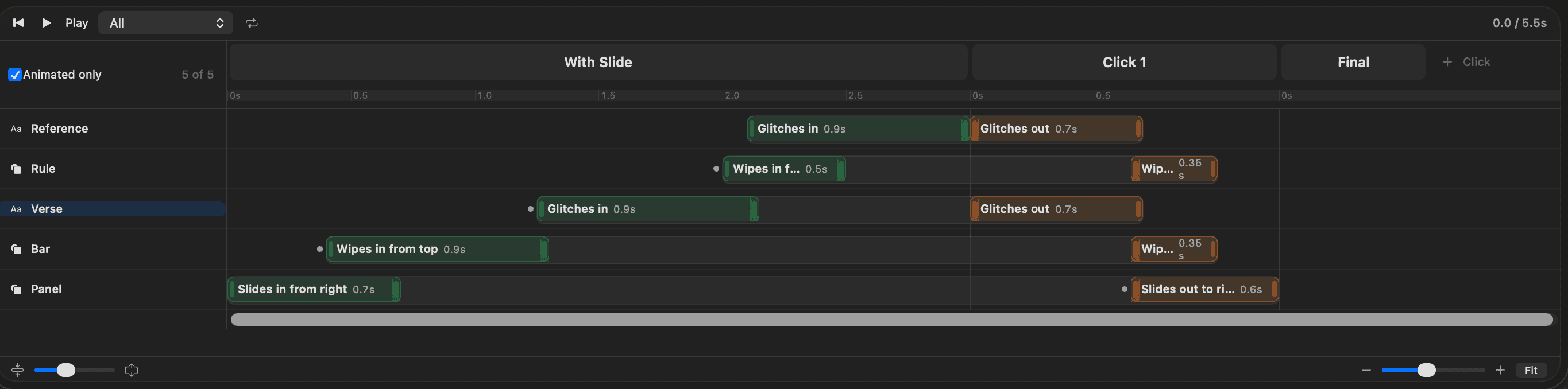
slides workspace showing a complete service, announcement media, song arrangements, livestream and confidence outputs, and service timers

01 · Prepare

Bring your songs
and slides.

Import ProPresenter or PowerPoint files, then put songs and slides in service order.

Sunday service09:30
01WelcomeSLIDES
Great Is Your FaithfulnessSONG
Chorus

Great is Your faithfulness
Morning by morning

03MessageSLIDES

02 · Create

Mix the look live.

Keep backgrounds moving as lyrics change. Add video and camera feeds. Adjust colors and effects live.

Layers

Turn a layer on or off. The rest keeps playing.

AUDIENCE OUTPUT
Great is Your faithfulness
Morning by morning
SUNDAY GATHERING09:30

03 · Present

One slide.
Every screen.

Full lyrics in the room. A line at a time on stream. Timers and the next slide on stage.

slides
Great is Your faithfulness
Morning by morning

In the room

Great is Your faithfulness

On the stream

CURRENT
Great is Your faithfulness
Morning by morning
NEXT
All I have needed
Your hand has provided
TIME LEFT04:32

On the stage

Stream to more than one platform.
Record at the same time.

Use Planning Center? Sync your service plans and song lyrics through MxU Dashboards.

If ProPresenter and Resolume
had a baby.

ProPresenter

Present the service.

  • Songs & arrangements
  • Service order
  • Stage screens & timers
Resolume

Mix the visuals.

  • Live effects & color
  • Video layers & masks
  • Camera & media inputs
slides

Both worlds. One app.

  • Songs + live visuals
  • Separate screen layouts
  • Streaming + recording

Restarting shouldn’t be part of the service plan.

Get early access
Compare all five alternatives
IncludedSee notesNot includedNot confirmed
Scroll to compare
Six current features in slides and five alternatives. A checked box with an asterisk means scope, plan or external service varies. Details and sources follow.
Features
slides
ProPresenter
Resolume Arena
Proclaim
EasyWorship
WorshipTools Presenter
Live visual effects
Included. Live effects on media, text and slide objects, with layer masks
Included with qualifications. Media effects and presets
Included. Live clip, layer and composition effects
Not confirmed. Live effect controls not confirmed
Different layouts for each screen
Included. Full-slide projection and line-by-line lower thirds from the same words
Included. Audience, stage, grouped and mirrored
Included. Advanced Output and screen routing
Included. Audience and confidence outputs
Included. Main, foldback and alternate outputs
Included with qualifications. Pro / Pro Plus
Stream to multiple platforms
Included. Stream to multiple destinations in different formats while recording, built into slides
Included with qualifications. Built-in single-destination RTMP. Multiple destinations use Resi or another streaming service; one ProPresenter screen is captured at a time.
Included with qualifications. Send NDI or Syphon output to OBS or another encoder for streaming. Direct platform streaming is not built in; native recording is available.
Included with qualifications. Presentation output is sent to an external encoder such as OBS for streaming and local recording.
Included with qualifications. NDI / alpha output to OBS, vMix or another broadcast system.
Included with qualifications. Window Display output is captured by OBS or another video controller.
Use ProPresenter files
Included. Import ProPresenter songs, media, themes, stage layouts, macros and screens
Included. Native presentation format
Not confirmed. Native document import not confirmed
Included with qualifications. Exported song lyrics
Not confirmed. Native document import not confirmed
Included with qualifications. Pro6 / Pro7 song lyrics
Stage display
Included. Custom confidence layouts with timers, next slide and live messages
Included. Customizable stage layouts
Not confirmed. Native confidence layouts not confirmed
Included. Current / next, timers and messages
Included. Foldback with next-slide information
Included with qualifications. Pro / Pro Plus
Song lyrics & arrangements
Included. Songs, sections and service order
Included. Reusable verse / chorus arrangements
Not confirmed. Native song arrangements not confirmed
Included. Saved songs and arrangements
Included with qualifications. Verse / chorus slide ordering
Included. Custom song and service orders
Comparison details & sources

Based on official documentation, checked October 7, 2026. An asterisk marks feature limits, paid plans or a required service. Coming-soon features aren’t counted as included.

slides
Live visual effects
Included. Live effects on media, text and slide objects, with layer masks
Different layouts for each screen
Included. Full-slide projection and line-by-line lower thirds from the same words
Stream to multiple platforms
Included. Stream to multiple destinations in different formats while recording, built into slides
Use ProPresenter files
Included. Import ProPresenter songs, media, themes, stage layouts, macros and screens
Stage display
Included. Custom confidence layouts with timers, next slide and live messages
Song lyrics & arrangements
Included. Songs, sections and service order
Platform
Apple Silicon Mac · macOS 14 or later
Pricing model
Free during early access
ProPresenter

slides combines live effects and native multi-destination streaming. Its two-way Planning Center sync requires MxU Dashboards. ProPresenter has direct SongSelect and Planning Center connections, with Mac and Windows support.

Live visual effects
Included with qualifications. Media effects and presets
Different layouts for each screen
Included. Audience, stage, grouped and mirrored
Stream to multiple platforms
Included with qualifications. Built-in single-destination RTMP. Multiple destinations use Resi or another streaming service; one ProPresenter screen is captured at a time.
Use ProPresenter files
Included. Native presentation format
Stage display
Included. Customizable stage layouts
Song lyrics & arrangements
Included. Reusable verse / chorus arrangements
Platform
Mac and Windows
Pricing model
Monthly or annual subscription for new licenses
Resolume Arena

slides combines lyrics, arrangements and stage displays with live layers and screen shaping. Arena goes further into VJ performance with audio-reactive parameters, keyframe envelopes, OSC and a larger effects library.

Live visual effects
Included. Live clip, layer and composition effects
Different layouts for each screen
Included. Advanced Output and screen routing
Stream to multiple platforms
Included with qualifications. Send NDI or Syphon output to OBS or another encoder for streaming. Direct platform streaming is not built in; native recording is available.
Use ProPresenter files
Not confirmed. Native document import not confirmed
Stage display
Not confirmed. Native confidence layouts not confirmed
Song lyrics & arrangements
Not confirmed. Native song arrangements not confirmed
Platform
Mac and Windows
Pricing model
Perpetual license; one year of updates included
Proclaim

slides adds live effect chains and screen shaping to service presentation. Proclaim connects SongSelect, Planning Center and shared presentation preparation in a team subscription.

Live visual effects
Not confirmed. Live effect controls not confirmed
Different layouts for each screen
Included. Audience and confidence outputs
Stream to multiple platforms
Included with qualifications. Presentation output is sent to an external encoder such as OBS for streaming and local recording.
Use ProPresenter files
Included with qualifications. Exported song lyrics
Stage display
Included. Current / next, timers and messages
Song lyrics & arrangements
Included. Saved songs and arrangements
Platform
Mac and Windows
Pricing model
Church presentation team subscription
EasyWorship

slides includes live effects and projection adjustments free during early access. EasyWorship 8 offers direct SongSelect access and reporting, with Mac and Windows apps and subscription plans.

Live visual effects
Not confirmed. Live effect controls not confirmed
Different layouts for each screen
Included. Main, foldback and alternate outputs
Stream to multiple platforms
Included with qualifications. NDI / alpha output to OBS, vMix or another broadcast system.
Use ProPresenter files
Not confirmed. Native document import not confirmed
Stage display
Included. Foldback with next-slide information
Song lyrics & arrangements
Included with qualifications. Verse / chorus slide ordering
Platform
Mac and Windows
Pricing model
Basic or Premium subscription; campus licensing
WorshipTools Presenter

slides includes independent outputs, confidence screens and live effects free during early access. WorshipTools offers direct SongSelect access and a connected worship-team suite, with additional outputs and stage displays on paid plans.

Live visual effects
Not confirmed. Live effect controls not confirmed
Different layouts for each screen
Included with qualifications. Pro / Pro Plus
Stream to multiple platforms
Included with qualifications. Window Display output is captured by OBS or another video controller.
Use ProPresenter files
Included with qualifications. Pro6 / Pro7 song lyrics
Stage display
Included with qualifications. Pro / Pro Plus
Song lyrics & arrangements
Included. Custom song and service orders
Platform
Mac and Windows
Pricing model
Free plan; Pro / Pro Plus for more features
Coming soon

Songs & lyrics

Chord editing, easier lyric layouts, a song library, Scripture and more languages.

Create together

AI-assisted slides. Cloud collaboration, shared libraries and backup.

Work from anywhere

A web editor, mobile app and automatic updates.

Cloud features are planned with MxU Cloud.

Early-access details

SongSelect. Import downloaded lyric text files. Direct sign-in and automatic CCLI reporting aren’t included.

For developers. Control slides and edit presentations through its API.

Free early access for vibe coders

Build your next
service with slides.

Test, customize and help build slides.

Apple Silicon · macOS 14 or later

Privacy policy